


Legal workflow management software used to be something only big firms talked about, but really, it was only a matter of time before it became a necessity for everyone.
Today, in-house legal professionals and corporate legal operations teams are dealing with the same rising workload and expectations.
And the reason for this isn’t that this term sounds impressive, but because the demands of modern-day practice have reached the point where old methods don’t work anymore. You’re dealing with clients who expect answers the same day and courts that keep making deadlines tighter and tighter. On top of that, the cases themselves no longer fit into neat patterns.
But you probably know all this.
You see the files spread across inboxes and deadlines written on sticky notes. Team members keep asking you for the same document because nobody has the record of the final version. This doesn’t mean your firm is disorganized. It just means that you are trying to keep up with a workflow and facing significant problems.
The work has outgrown the tools you’re using, and it needs strategic changes.
Defining the Core Concepts
What is a Legal Workflow?
Legal workflow is just the step-by-step process a legal practice follows while handling a case, from start to finish. This includes keeping track of every task, document, and approval that is needed to keep the matter moving forward. A clear workflow keeps the work consistent and transparent.
What is Legal Workflow Management Software?
Legal Workflow Management Software is a tool designed to map, execute, and monitor the existing workflows. It brings the case files, documents, emails, and deadlines together in one place for better legal execution.
Why Legal Workflow Management is So Important Today?
Most legal work is a mix of documents, deadlines, emails, calls, and back-and-forth messages that arrive out of order. Workflow software doesn’t simplify the law itself but makes managing the work easier.
Of course, workflow software doesn’t make the law simpler, but it makes managing all parts around it easier.
Keeps Your Case Files and Documents Organized
A good workflow platform puts every document, message, and all details on a case in one location through effective document management, so you don’t end up losing non-billable hours digging through inboxes. All it takes is to open a file, and everything is in front of you. Access to the right file with the necessary details provides the full picture right away.

Automates Your Routine Tasks
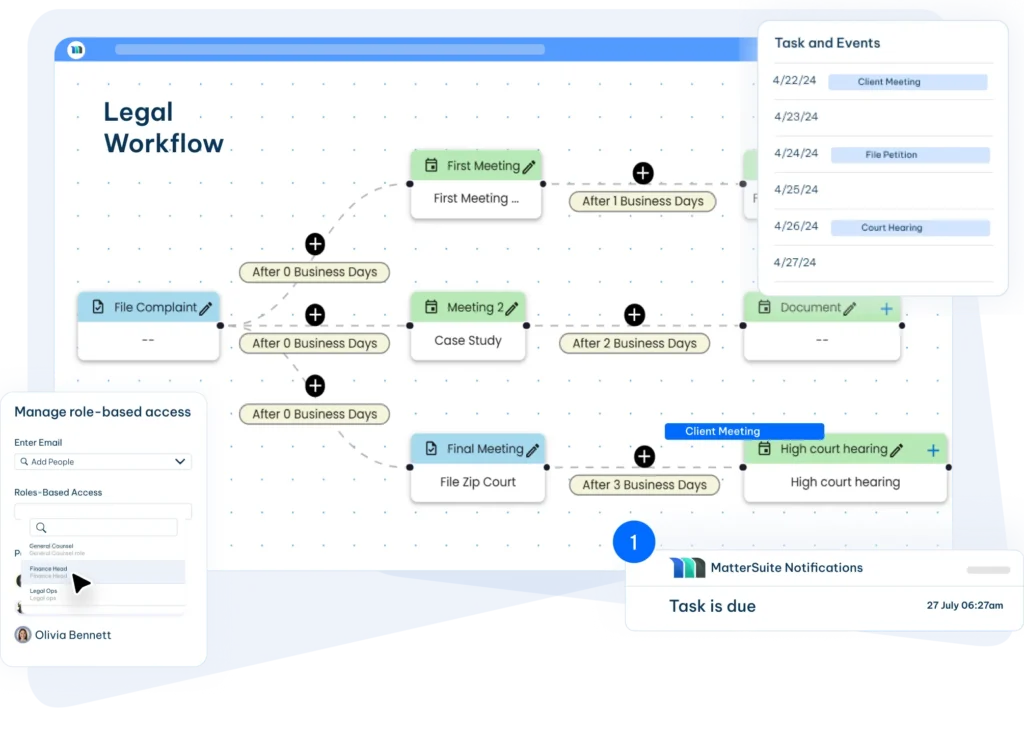
The software handles those simple tasks that are easy to miss, like deadline reminders and filing alerts. It tracks these items in the background and notifies you when something needs your attention. This way, you have fewer manual reminders to manage, and you avoid clerical mistakes that could become significant problems later.
Supports Team Coordination
Team members can see what they’re responsible for and what stage a case is in. Tasks move smoothly from one member to another because everyone follows the same set of instructions and deadlines. This way, cases stay on track, and it helps avoid confusion.
For in-house teams, this means faster contract approvals, quicker input on compliance issues, and less back-and-forth with departments like Sales, HR, Procurement, and Finance.
Provides Data Security
Files stay protected behind permissions and encrypted storage. You decide who can open or edit each document, and you can also track when something was accessed. This means reduced risk regarding emailing sensitive information or storing important files on personal devices. Corporate legal departments especially benefit here, since they handle confidential business information and must follow strict internal compliance rules.
Offers Useful Reporting
The dashboards you’re provided with are a game-changer because they show workload, upcoming deadlines, progress on active cases, and more. This gives you clear, current information to base your decisions on and allows you to see what is causing the delay.
Some 2025 Data Points That Show Legal Workflow Management Software is on the Rise
| ► Approx. 45% of all solo/small law firm time is spent on doing administrative tasks. – Law Pay ► 74% of surveyed small law firms are under the impression that they spend too much time on admin tasks instead of practicing law. – Thomson Reuters ► Operational inefficiency is one of the top issues facing small law firms, and while more than 5% of small law firms recognize this issue, many take no action to address them. – Thomson Reuters ► Most legal work is a cocktail of documents, deadlines, emails, calls, and back-and-forth messages with clients and/or legal colleagues. – Thomson Reuters ► Clients expect significantly faster response times and more frequent communication from law firms compared to five years ago. – Thomson Reuters ► The global Legal Practice Management Software market has grown from $2.06 billion (USD) to $2.37 billion since the previous year (a 15.05% increase from 2024 to 2025); the market is expected to reach $4.81 billion USD by 2030. – Business Wire ► U.S. Legal Teams are required to balance operational efficiency with rigorous compliance mandates. – Business Wire ► While Western Europe law firms emphasize hybrid models, in the U.S., law firms demand enterprise-class cloud solutions. – Business Wire |
How Corporate Law Departments Benefit From Using Workflow Tools
When a firm moves its work into a structured system, the pace of daily tasks changes in an instant. Documents don’t get buried in inboxes. There are less delays due to lost files. This is true across both law firms and corporate legal departments facing high-volume contract review, compliance work, or constant internal requests. Everyone follows the same steps and uses the same information, so cases move faster.
You have better visibility into upcoming tasks, which shortens the turnaround times and keeps matters from becoming chaotic.
Deadlines become easier to manage with automated alerts, which ensure filings and follow-ups aren’t missed. Everything is documented as the case moves forward, creating dependable audit trails that support compliance and reduce the risk of overlooking important steps.
The administrative workload drops as well. Lawyers spend more than 48% of their time on administration, which is a huge number. With routine coordination, document tracking, and task assignments, the legal processes are streamlined, allowing both attorneys and support staff to focus on clients.
Most importantly, your clients gain clarity. With clearer updates and faster replies, you strengthen confidence in the firm’s service. When you have all your internal processes running smoothly, communicating with clients becomes predictable, as well, which works miracles for trust.
All of these improvements add up financially. When billable work replaces time spent searching for information or fixing bottlenecks, the entire practice becomes more efficient.
Even teams with heavy caseloads that move fast – personal injury attorneys, immigration law teams, criminal defense teams (especially public defenders), family law firms, housing/eviction defense teams, workers’ compensation law firms, etc. – see these gains most clearly.
What to Look For in Legal Workflow Software
Not all workflow tools are built with legal teams in mind. The right system should take care of repetitive tasks for you, help you keep matters organized, and support the way lawyers actually work.
Core features that matter
- Automatic task creation, reminders, and deadline alerts
- Document assembly from saved templates
- Standardized intake that keeps client info clean from day one
- Built-in email and communication tools
- Integrations with tools you rely on, like Outlook, Gmail, Salesforce, and DocuSign
- AI tools that help with review, contract checks, and gathering key data
- Case dashboards for visibility
- Calendar updates that keep schedules accurate
- Collaboration without multiple email chains
- Reporting tools that show where time is going
- Strong security and permissions to protect client data
- Easy to adopt
- Full matter and project tracking to keep everything moving
The upside for your practice
For corporate legal teams, these improvements mean fewer delays for the business and more time focusing on proactive legal strategy instead of putting out fires.
- Less time wasted on admin
- Fewer mistakes because everyone follows the same steps
- Savings that show up across every case
- A predictable experience for clients
Will legal workflow automation replace lawyers?
The short answer is no. Legal workflow automation can handle your routine and repetitive tasks, but it cannot bring legal reasoning to your practice. It sends reminders, routes documents, and monitors deadlines, which makes your day-to-day legal work easier, but it cannot build arguments or make informed decisions for a client.
What it does is give legal professionals more time to perform the work only they can do. By reducing administrative load, lawyers can spend more time preparing cases, meeting clients, and improving service quality. Automation becomes a support system that strengthens legal practice, not a substitute for the expertise behind it.

Conclusion
Legal work is evolving and becoming more complex day by day, yet the time available to manage it remains the same. Legal teams aim to stay efficient and meet the rising demands of clients who need tools that help them operate with more structure and clarity. Legal workflow management software offers the solution to modern-day legal problems like bottlenecks and missing deadlines, and eliminates the constant hunt for documents and updates.